How to Look Up Your Wisconsin Hunter Safety Card
Your Wisconsin hunter education certificate lives inside your Go Wild account, the same portal the Department of Natural Resources (WI DNR) uses for license sales and registrations. Once your course results process, the certificate becomes available to print from your Student Dashboard, typically after the first day of the month following completion.
From there, you can print it yourself, request an optional Go Wild Conservation Card as a physical backup, or use it however your license documents already display it.
Most Wisconsin hunters run into this the same way: gun deer season is approaching, and it's been a while since anyone logged into Go Wild. The reassuring part is that a hunter education certificate in Wisconsin never expires, so pulling up an old record doesn't mean retaking anything.
Below, we'll walk through logging into Go Wild, what to do if your certificate isn't showing up, and what else you'll want on hand in the field. For the general process most states follow, see our guide to looking up your hunter safety card.

How to Look Up Your Wisconsin Hunter Education Certificate
Where you start depends on whether you already have Go Wild login credentials.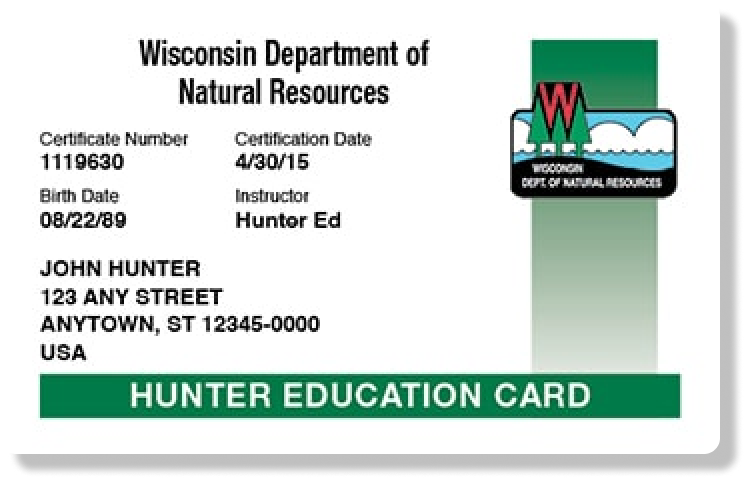
- Sign in directly if you have a username and password: Go to gowild.wi.gov and log in. Anyone who's accessed their account since 2025 was required to set these up, so try this first.
- Use the account lookup tool if you don't have login credentials: Visit gowild.wi.gov/lookupaccount and search using your customer number, Social Security number, or driver's license, paired with your date of birth.
- Open your Student Dashboard: Once you're in, find the Safety Education section and select "Print Awarded Certificates" to pull up your Hunter Education Safety Certificate at no charge.
If your course was completed within the last several weeks, keep in mind it may not post to your dashboard until after the first of the following month.
If Your Certificate Isn't Showing Up in Go Wild
A blank result in Go Wild doesn't necessarily mean your certification didn't go through. Try these steps first.
- Give it a little more time: If you finished your course recently, your certificate may simply not have processed yet, since Wisconsin batches new certifications monthly rather than posting them instantly.
- Double-check which account you're searching: Hunters who've created more than one Go Wild profile over the years sometimes search the wrong one by mistake.
- Contact WI DNR directly: Call 1-888-936-7463 (7 a.m. to 10 p.m.) if your certificate still isn't appearing after a reasonable wait.
Sort this out before opening day rather than after. Anyone born on or after January 1, 1973, needs a hunter education safety certificate on file to buy a hunting license in Wisconsin, and the state expects you to have it accessible while you're afield.
Replacing a Lost or Damaged Hunter Education Card
Wisconsin gives you a few different ways to get a copy back, depending on how you'd like to receive it.
- Print it yourself: Log in at gowild.wi.gov, open your Student Dashboard, and select "Print Awarded Certificates," free of charge.
- Print through a license agent: Visit any Go Wild license agent, where a small print processing fee typically applies.
- Visit a DNR Service Center: Stop by during regular business hours if you'd rather have staff pull up your record in person.
Hunter-Ed's own Lost Your Card? section on the Wisconsin course page points to the same Go Wild lookup process described above.
What Documentation Does Every Wisconsin Hunter Need in the Field?
Your hunter education certificate is just one of several things a warden may ask to see. Keep the following on hand any time you're out hunting.
Documents You Need to Hunt in Wisconsin | |
| What You Need | Where to Get It |
| Hunter Safety Certification (Original or Replacement Card) | Hunter-Ed Wisconsin hunter safety course |
| Hunting License | Wisconsin hunting license fees page |
| Tags and Permits | Wisconsin permits, licenses, and registrations |
A certificate earned in another state, Canadian province, or Mexico satisfies Wisconsin's requirement as well, so an out-of-state record generally carries over here without extra paperwork. If you still need to knock out your Wisconsin hunter education requirement, signing up for the course through Hunter-Ed covers the online portion in one sitting.
From there, as you're getting into hunting, it's worth brushing up on gear and field basics before your first outing.

Find Your Wisconsin Hunter Education Certificate Before the Season Begins
Locating your Wisconsin certificate almost always comes down to Go Wild: log in directly if you have credentials, use the account lookup tool if you don't, then print straight from your Student Dashboard.
If you haven't completed your Wisconsin hunter education requirement yet, the Hunter-Ed Wisconsin course walks you through registration, coursework, and your certificate from start to finish.
Frequently Asked Questions (FAQs)
Q: How long after finishing my course can I print my Wisconsin certificate?
A: Your Wisconsin hunter education certificate typically becomes available to print from your Go Wild Student Dashboard after the first day of the month following course completion. If you finished your course close to the end of a month, expect a short wait before it posts to your account.
Q: What is a Go Wild Conservation Card?
A: A Go Wild Conservation Card is an optional physical card that stores your Wisconsin licenses, permits, and hunter education certification in one place, similar to a wallet ID. It's especially useful for youth hunters and nonresidents who can't rely on an authenticated Wisconsin driver's license to display their credentials in the field.
Q: Do I need to carry my hunter education certificate while hunting in Wisconsin?
A: Yes, Wisconsin hunters born on or after January 1, 1973, need proof of their hunter education certification accessible while hunting. That proof can be a printed copy, a Conservation Card, or a display on your Go Wild account through a mobile device. Keeping a digital copy on your phone generally satisfies this requirement.
Q: Does my Wisconsin hunter education certificate expire?
A: No, it never expires. Once WI DNR certifies you, your Wisconsin hunter education certificate stays valid for life and never needs to be renewed. Only your hunting license needs to be purchased again each year.
Q: Can I use an out-of-state hunter education certificate to buy a Wisconsin hunting license?
A: Yes, Wisconsin accepts hunter education certificates issued by other U.S. states, Canada, and Mexico. Keep your original certificate accessible when purchasing a license, since it won't automatically show up inside your Go Wild account.
Q: What if I have more than one Go Wild account?
A: If you've created multiple Go Wild profiles over the years, your hunter education record may be tied to a different account than the one you're currently searching. Try the account lookup tool with your original identifying information, or call 1-888-936-7463 to confirm which profile holds your certification.
Q: Is there a fee to replace a lost Wisconsin hunter education certificate?
A: Printing your certificate yourself through your Go Wild Student Dashboard is free. Getting a copy printed through a Go Wild license agent typically carries a small processing fee, while visiting a DNR Service Center in person doesn't add any extra cost.